Explore financial options with more clarity
We help you review personalized loan offers, compare credit cards, and track your credit and debt progress in one place. You can take your time and decide what fits your goals best.
No hidden comparison fees
256-bit SSL Encrypted
Verified & Secured
APR clarity
1 profile
Quick compare
Explore by mode
Choose one mode at a time to preview a focused workflow: loan offers, credit cards, credit score tracking, or debt planning.

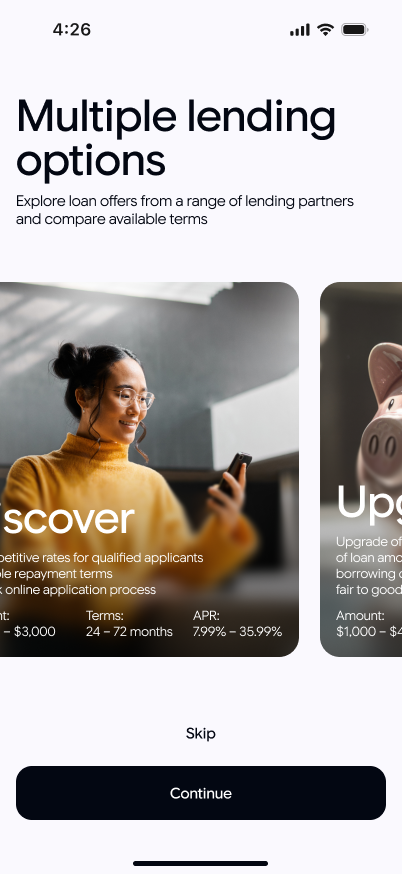
Offer discovery
Review loan offers in one structured view
Compare available loan offers by amount, APR range, and repayment window.

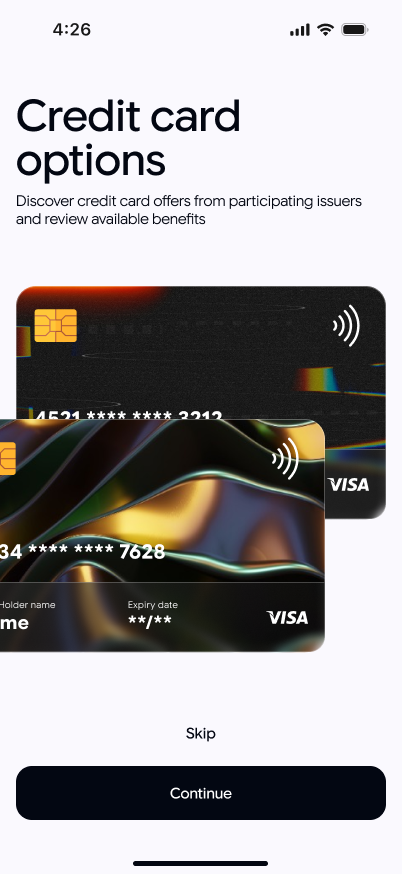
Card overview
Review credit cards in one dedicated section
Compare card options by rewards type, annual fee, APR profile, and usage fit.

Credit insights
Track score movement over time
Follow your score trend and see practical markers that may support profile growth.

Debt overview
Keep balances and payments in one calm dashboard
See what is paid, what is next, and how each payment contributes to completion.
Browse lenders and cards
Quick preview carousels let visitors scan popular options before opening full lists.
Credit cards

Capital One Savor Cash Rewards

Discover it Cash Back

Capital One Venture X Rewards
Lenders

All core app modules
A dedicated place for each key function so visitors immediately understand the full product scope.
Loan offers list
Direct list view for quick scanning by amount, APR range, and term.
Credit cards
Card options with reward highlights, fee profile, and usage context.
Credit score tracker
Simple range visualization and progress tracking over time.
Debt tracker
One dashboard for balances, payment status, and completion progress.
Credit score tool
A focused score dashboard that helps users follow movement over time and understand key changes at a glance.
Current score
760
Good
30-day movement
+24
Up
Score history points
18
Range indicator
Fair -> Good
"The score view is simple and clear. I can check where I stand today and see whether my trend is moving in the right direction."
Credit score tool feedbackStep 1: Open current score card
Instant view of range and recent movementStep 2: Review score history
Track changes with plain labelsStep 3: Apply action notes
Use lightweight guidance to maintain progressDebt tracker tool
A dedicated debt view for balances, payment schedule, and completion progress across all active accounts.
Total tracked debt
$6,300
89%
Next due payment
May 12
On time
Active debt accounts
4
Paid this month
$740
"I can finally see balances, due dates, and progress in one place. The structure makes monthly planning much easier."
Debt tracker tool feedbackStep 1: Add debt accounts
Store balance and payment schedule by accountStep 2: Mark payments
Track paid amounts and upcoming due datesStep 3: Follow completion trend
See remaining balance and percent completedHow it works
The app experience is designed to cover each core action with a clear sequence from browsing to ongoing tracking.
Browse loan offers
Open the loan list and review amount, APR range, and repayment window.
Compare lenders
Filter and compare lender options to shortlist offers that fit your plan.
Review credit cards
Explore cards by fee profile, APR, and rewards structure.
Track credit score
Use the score tool to monitor range movement and monthly progress.
Manage debt dashboard
Track balances, payment status, and next due dates in one timeline.
Move to provider flow
Continue to a selected offer only when terms are clear and comfortable.
From our blog
Calm, structured explainers on comparing loans, reading card terms, and organizing debt payoff without guesswork.

How to Compare Loan Offers Without Stress
Why offers feel inconsistent, how to compare every loan with the same four numbers (APR, term, payment, total), and how to filter unclear options early.

How to Read Credit Card Terms Before You Apply
Multiple APR types, intro periods, fees, daily interest, grace periods, and how to weigh rewards against real usage before you apply.

Snowball vs Avalanche: Two Debt Payoff Paths
Why structure beats willpower alone, how snowball builds momentum and avalanche cuts total cost, and when a hybrid path can work.
Common loan purposes
Example use cases below show how visitors often frame their borrowing goals before comparing providers.
Rent
Short-term support for housing-related payments.
Medical
Planned or unexpected healthcare expenses.
Home
Repair and improvement projects with staged costs.
Education
Course fees, materials, and skill-building programs.
Travel
Pre-planned travel costs with transparent repayment.
Other
General-purpose needs with clear term comparison.
Frequently asked questions
Does checking options affect my credit score?
Initial browsing and comparison views are informational and designed for safe exploration.
Are these final offers?
Offer cards on this stage are sample-format previews. Final conditions are set by participating providers.
Can I use only one module, like debt tracking?
Yes. Modules are designed to work together, but each can also be used independently.
Will there be dedicated pages later?
Yes. Product pages, blog structure, and deep comparison sections are planned for upcoming phases.
Can I browse cards and lenders separately?
Yes. You can open dedicated list pages for lenders and credit cards and review each category independently.
Do you provide loans directly?
No. Kradevic: Loan & Credit Guide is an informational platform that helps you explore and compare available offers from participating providers.
What does the credit score tool show?
It shows score range visibility, recent movement, and simplified progress notes so you can track trends over time.
What can I do in the debt tracker?
You can monitor balances, payment status, due dates, and completion progress for multiple debt accounts in one dashboard.
Ready when you are
App Store
Build your financial picture step by step
Start with the main dashboard now. Dedicated pages for each product category will follow in the next iterations.
Calm comparison flow
Transparent provider details
One place for loans, cards, and tracking